Divers / guests
Every diver or guest you ever saved, with their level, sizes and medical notes — filled automatically from bookings.
In the app: /r/divers
Screens
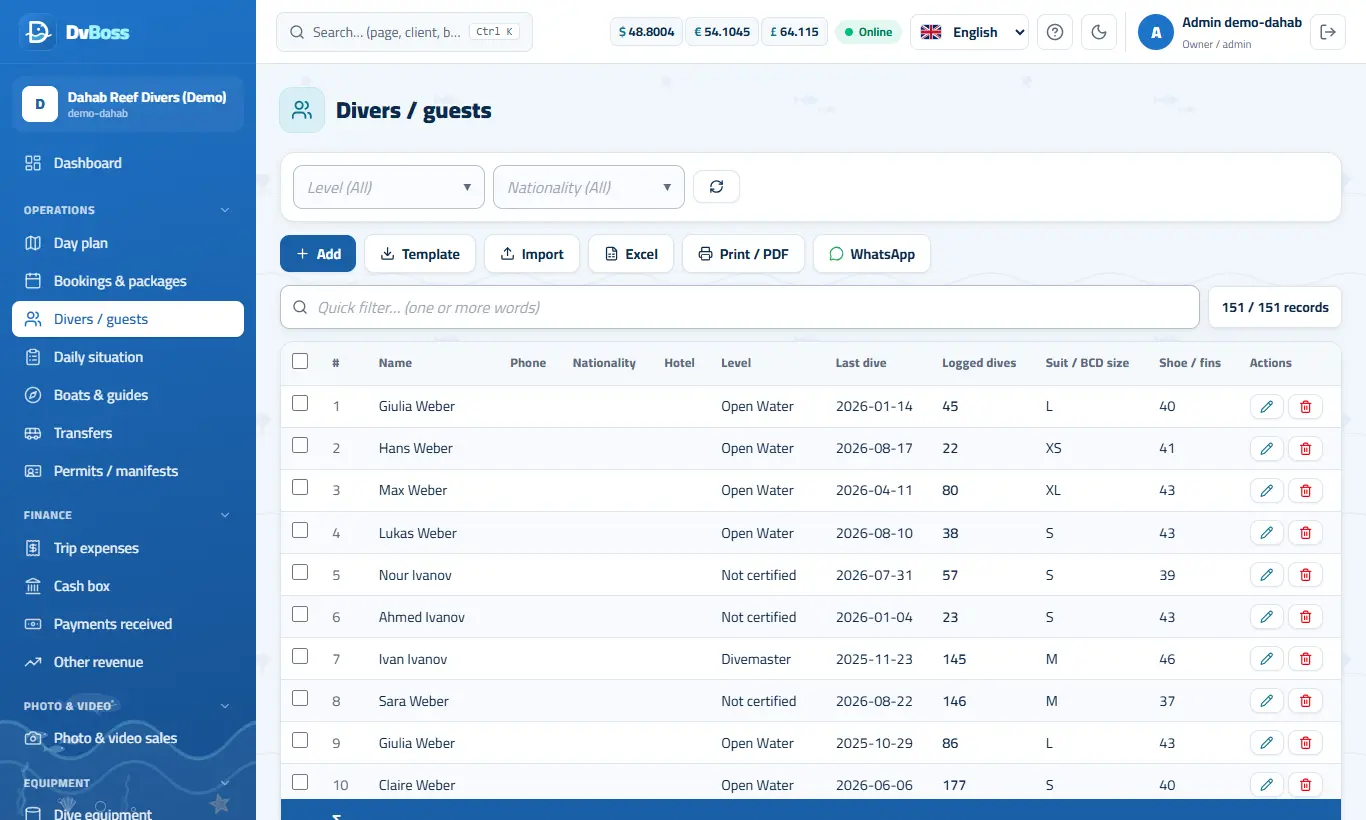
Controls on every list screen
Day / Month / All — show one day, one month or everything.
Date box, ◀ ▶ and Today — move to another day or month.
Filter boxes — narrow the list by the screen's main fields (yes/no fields offer All / Yes / No). 🔄 reloads.
Add — opens an empty form; the date and active filters are filled in for you. Save & new keeps your picks for the next row; Ctrl+Enter saves.
Template and Import CSV — download the column headings, fill them in a spreadsheet, save as CSV and import (up to 5,000 rows; errors are listed per row).
Excel — downloads the rows shown as a CSV file with a totals line.
Print / PDF — prints the list with the center name and period.
WhatsApp — sends the number of rows and the totals to the report number in Settings.
Finalize day / Finalize — on screens that can be closed: closes every row shown, or only the ticked ones.
Tick boxes — select rows, then Unlock (managers) or Delete.
Quick search — every word you type must appear in the row; shows "shown / total".
Column titles — click to sort; the bottom line shows totals. ✏️ edits a row (or double-click it), 🗑 deletes it.
Fields
Every field of the form, in the order the form shows them. * = required. "automatic" = filled in by the system.
| Field | Type | What to enter |
|---|---|---|
| Name* | Text | Full name. |
| Phone | Phone | Phone number with country code, e.g. +49 170 1234567 — used for WhatsApp. |
| E-mail address. | ||
| Nationality | Pick from a list | Nationality, from Lists → Nationalities. |
| Hotel | Pick from a list | The guest's hotel, from Lists → Hotels. |
| Level | Choice | Certification level; shown on the day plan and the team brief. Not certifiedScuba DiverJunior OWOpen WaterAdvanced OWRescueDivemasterInstructor |
| Agency / cert. no. | Text | Certifying agency and card number, e.g. PADI 123456. |
| Last dive | Date | Date of the last dive; the team brief shows the latest. |
| Logged dives | Whole number | Logged dives. |
| Suit / BCD size | Text | Wetsuit / BCD size; counted in "equipment needed" on the day plan. |
| Shoe / fins | Text | Shoe or fin size. |
| Weights (kg) | Number | Weights needed in kg. |
| Birthdate | Date | Date of birth. |
| Medical notes | Text | Medical notes; shown as alerts on the day plan and in the brief. |
| Notes | Text | Anything worth remembering; free text. |
Who can do what here
| Role | View | Add | Edit | Delete |
|---|---|---|---|---|
| Owner / admin | ✓ | ✓ | ✓ | ✓ |
| Manager | ✓ | ✓ | ✓ | ✓ |
| Accountant | ✓ | ✓ | ✓ | ✓ |
| Operations / front desk | ✓ | ✓ | ✓ | — |
| Photographer | — | — | — | — |
| Permit clerk | ✓ | — | — | — |
| Read only | ✓ | — | — | — |